 Minute It
A personal story about family, memory, and privacy — by Terry Wang.
Seven years ago, my daughter was born.
Like many new parents, I started taking a few photos and short videos every day. As her one-month celebration approached, I wanted to make a short video to share with our family. Especially for my parents.
That’s when I discovered an app called 1 Second Everyday. I loved it immediately. Every month, I turned our family photos and videos into a short recap. It became a small tradition that stayed with us for the next seven years. I even recommended it to many friends who had just become parents.
Looking back now, those videos became much more than monthly recaps. They quietly became part of my family’s history. There’s one short clip I’ll probably keep for the rest of my life. It was my grandmother holding my daughter for the very first time.
At the time, it felt like just another ordinary family moment. After my grandmother passed away, that short clip became priceless.
You never know which ordinary moment will become priceless.
With 1SE, taking a few photos and short videos every day became part of our family’s routine. Birthdays. Family trips. Ordinary weekends. Watching my daughter grow up, and later, my son as well. Over time, I built a collection of memories that meant more to me than I had ever expected.
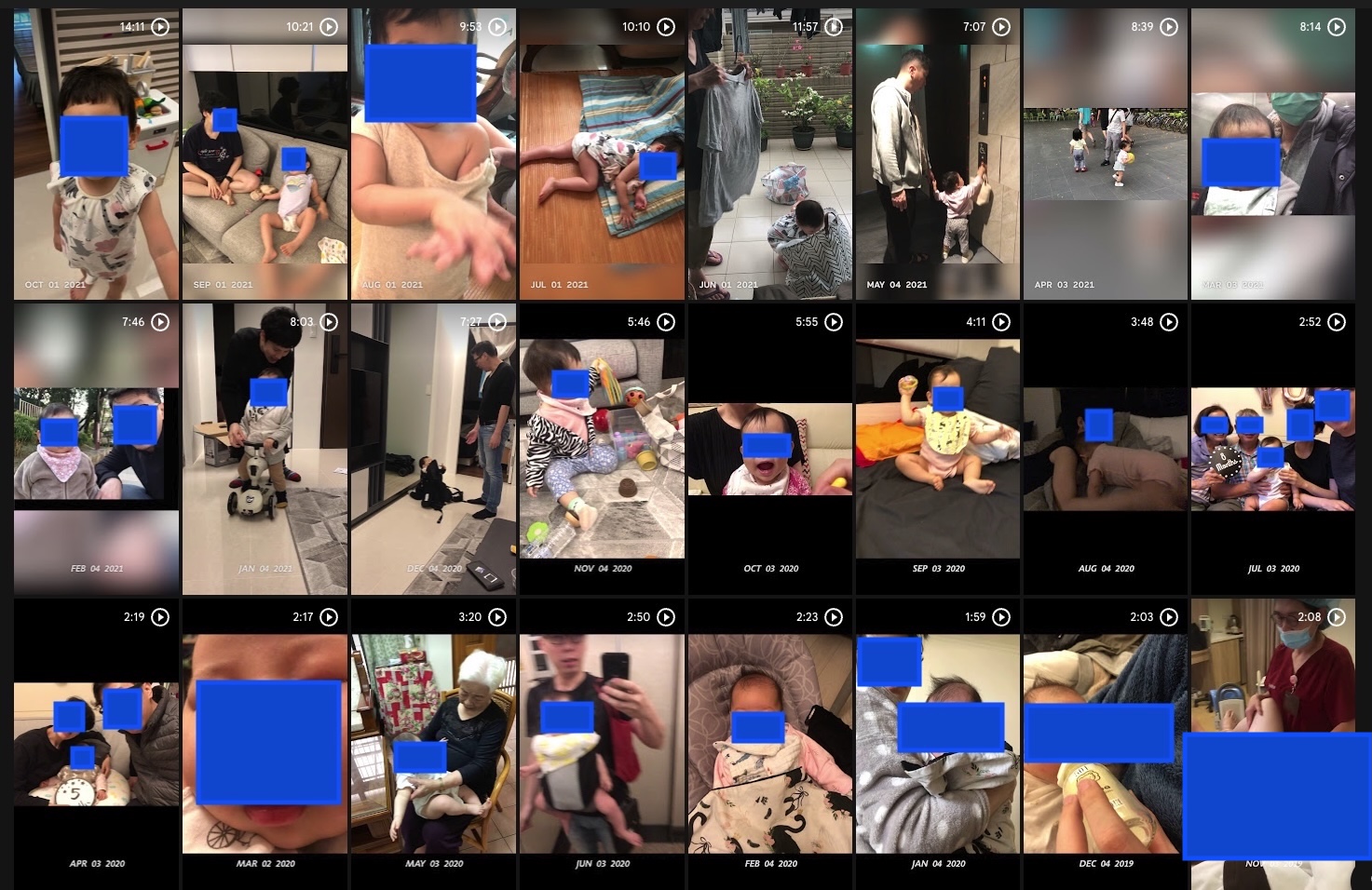
You may notice that some faces are covered. There is a reason for that. A few years later, AI became incredibly good at recognizing faces. For the first time, I started thinking differently about where my family’s photos and videos were stored.
I wasn’t afraid of technology. I was and still am a programmer. I simply realized that these memories were too important for me to treat casually. When I discovered that my media could be synchronized to cloud services, I turned that feature off. I kept paying for the subscription because I still loved creating those monthly recap videos.
What if I could enjoy the same experience, while keeping every photo and every memory on my own device?
I started looking for an app that worked the way I wanted. Something that could turn my monthly photos and videos into a recap video. Without uploading anything. Without creating an account. Without storing my family’s memories on someone else’s servers.
I couldn’t find one. So I decided to build it myself. The first line of code was written in February 2025.
At first, progress was slow. AI coding tools were still in their early days, and I built the app one class at a time. Eventually, I paused the project. A few months later, AI-assisted development improved dramatically. I came back with a completely different workflow, and suddenly everything moved much faster.
After more than a year of evenings, weekends, and countless iterations — Minute It was finally ready.
When I started building Minute It, I wasn’t trying to create the perfect app for everyone. I was building the app I wanted for my own family. That decision influenced almost every design choice.
I don’t believe cloud services are bad. In fact, I still use some of them every day. But I wanted another option — an app that could create monthly recap videos without uploading my family’s photos and videos anywhere.
That’s why every recap video is generated directly on your device. No account. No server processing your memories. No photo uploads just to create a video.
Minute It only asks for the permissions it genuinely needs. Access to your photo library is essential because that’s where your memories already are. The only network access is for crash reporting, so I can fix problems when something goes wrong. That’s it.
Privacy isn’t a feature that was added later. It was part of the design from the very beginning.
When I first started building Minute It, I wasn’t thinking about launching a business. I was simply trying to solve a problem for my own family. As the app slowly took shape, I began to wonder: what if I’m not the only one?
Maybe somewhere in the world, there’s another parent who takes a few photos every day. Someone who also enjoys creating monthly recap videos. Someone who simply wants those memories to stay on their own device. Maybe Minute It can help them, too.
If that happens, then every late night, every weekend, and every line of code will have been worth it. Thank you for taking the time to read my story. I hope Minute It becomes a small part of yours.
— Terry Wang
六年前,我的女兒出生了。
和很多新手爸爸一樣,我開始每天拍幾張照片、錄幾段短影片。比如小孩笑了一下,第一次大便、第一次睜開眼睛,喝完奶奶,睡著了⋯⋯那些平凡的小瞬間。
台灣有滿月酒,女兒滿月前,我想做一支短短的影片,分享給家人。尤其是我爸我媽。就在那時候,我開始用了 1 Second Everyday(1SE)。我一用就被黏住了。
我記得,剛開始一天對於放進去的照片跟影片的數量跟長度是有上限的,所以要慎選兩秒的照片或影片。你可以看到後面的圖,前面好幾個月,影片的時間大概只有幾分鐘,一個月兩分鐘,還行啦。後來就用很兇了,兩分鐘根本不夠,哈哈。
從那之後,每個月我都會把這一個月拍的照片和影片整理成一支回顧影片。這個習慣,一做就是六年。我也把這個 App 推薦給很多剛成為爸爸媽媽的朋友。
現在回頭看,那些影片早就不只是每月回顧。它們慢慢變成了我們家的共同回憶。
你看上面,其中有一段影片,現在對我來說,突然變得超級重要超級珍貴的。那是我阿嬤某一次(很可能是第一次)抱著我女兒。拍攝當下,我只覺得那是一個再普通不過的畫面。直到前年,阿嬤過世了。那段短短幾秒鐘的影片,突然變得無可取代。
你永遠不知道,今天一個再平凡不過的瞬間,哪一天會變成你最珍惜的回憶。
如果你仔細看上面的縮圖,會發現很多人的臉都被我蓋起來了。因為某一天,我突然意識到,AI 已經進步到一個很可怕的程度。身為一個工程師,我知道現在的人臉辨識技術有多厲害。但身為一個爸爸,我更在意的是:我孩子的照片,應該由誰保管?
我不是反對雲端。Google Photos 我到現在還在用。1 Second Everyday 我也付費訂閱了好幾年。但是當我發現,1SE 預設會把我手機裡的照片和影片同步到他們的雲端時,我心裡的警報開始響了起來。我花了一點時間,才在設定裡找到把這個功能關掉的方法。
可是,即使關掉了,我心裡還是一直有一個問題。如果只是想把一個月的照片整理成一支影片,真的有必要先把所有照片和影片複製一份到別人的伺服器嗎?而且,我有付錢耶,可是我把那個功能關掉了,也沒打折啊!
總之,在付了六年的訂閱費以後,我終於有點時間開始自己做做看同樣功能的 App。
2025 年 2 月,我寫下了第一行程式。老實說,一開始我很有自信。不就是把照片和影片接起來嗎?有 AI 幫忙,應該不用多久吧?結果,我完全想錯了。真的,非常難。
光是 iOS、Android、Live Photo、Motion Photo、HDR、各種影片編碼,就有數不清的組合。每解決一個問題,又會冒出另一個。那時候 AI 寫程式還沒有現在成熟。我還是很堅持,一個 class、一個 class 慢慢寫。現在回頭看,那時候有點固執,也因此進度非常慢。
工作、家庭、兩個孩子,把我的時間切得零零碎碎。寫了一陣子,我累了,停了下來。幾個月後,AI 寫程式的能力突然突飛猛進。我就重新試試看,但這一次,我換了一種方式開發。
從那個時候開始,在感嘆 AI 能力之餘,Minute It 開始慢慢長出樣子了。一年多後,它終於完成了。我那個,我一直找不到、卻一直很想用的 App,終於完成了。
開始開發 Minute It 的時候,我並不是想做一個適合所有人的完美 App。我只是想做出一個,我自己和家人真正想用的 App。這個想法,也影響了後來幾乎每一個設計決定。
我不認為雲端服務不好。事實上,到今天我每天都還在使用這些服務。只是,我希望 Minute It 提供另一種選擇:一個可以把每個月的照片和影片整理成回顧影片,卻不需要把家人的照片和影片上傳到任何地方的 App。
因此,Minute It 的每一支回顧影片,都是直接在你的裝置上完成。不用建立帳號。不用透過伺服器處理你的回憶。不用先上傳照片,才能製作影片。
Minute It 只會要求它真正需要的權限。需要相簿權限,是因為你的影片相片跟回憶,本來就存在那裡。唯一需要網路的地方,是 Crash Report;如果 App 發生錯誤,我才能收到資訊,把問題修好。除此之外,就沒有了。
這個隱私的保護,不是後來才加上的功能。它從第一天開始,就被設計到 Minute It 裡面。
隨著 App 一點一點完成,我開始想:我應該不是唯一一個遇到這個問題的人?也許,在世界的某個角落,也有另一位爸爸、媽媽,每天拍幾張照片、錄幾段影片,也喜歡每個月做一支回顧影片,也希望這些回憶,可以一直留在自己的裝置裡。
如果 Minute It 剛好也能幫助他們,那就太好了。如果真的是這樣,那這一年多來,每一個晚上、每一個假日,還有每一行程式,都值得了。
謝謝你願意花時間讀完這個故事。也希望有一天,Minute It 能成為你們家回憶的一小部分。
— Terry Wang